Database Sharding: What Happens When One Database Isn't Enough?
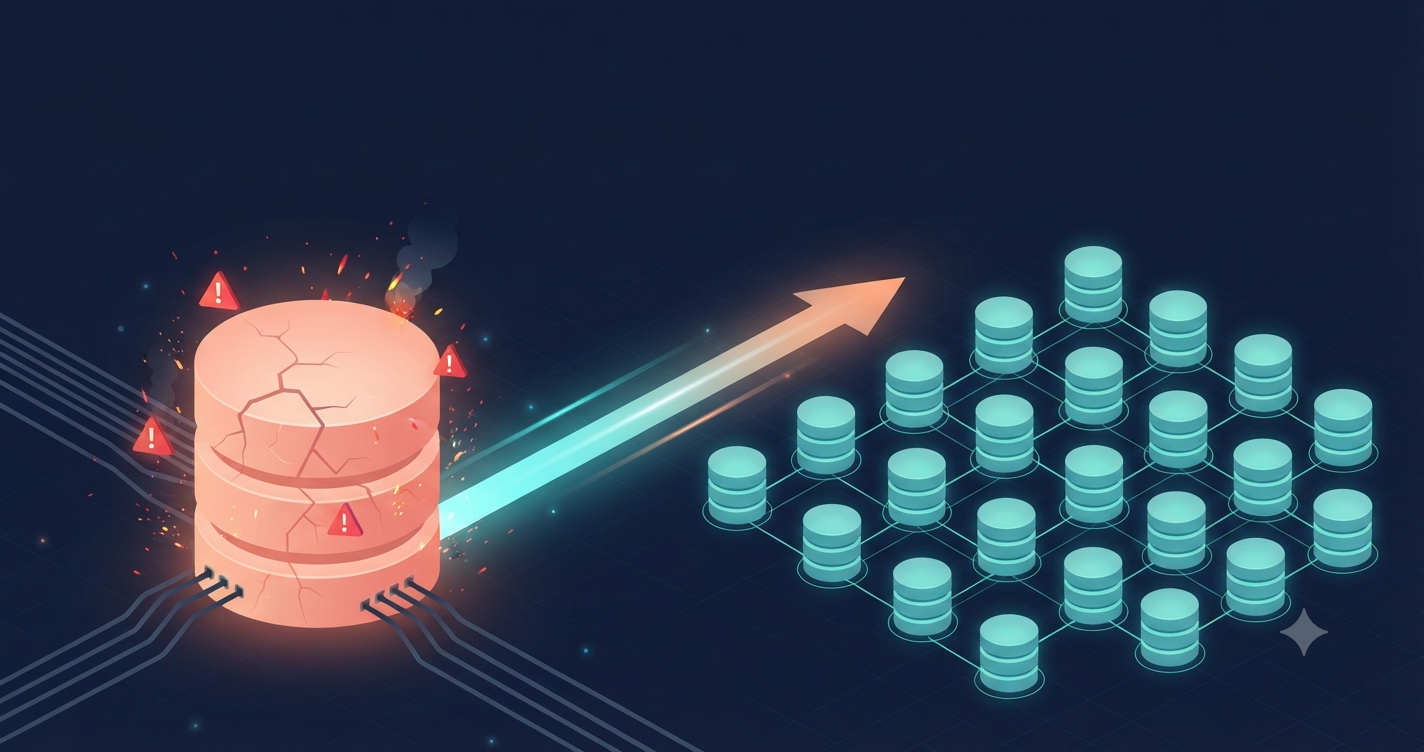
Imagine you're the engineer at Notion. I have no idea how their stack actually looks inside, so treat this as a thought experiment. Your product has hundreds of millions of users, and everything lives in one PostgreSQL cluster.
For years, that cluster has been a quiet hero. Then the pages start coming in.
Queries that took milliseconds now take seconds. Your biggest indexes no longer fit in memory. Writes pile up. The nightly backup is still running when the morning shift logs in. You upgrade the machine, and it helps for a while. Then you upgrade it again, and it helps a little less.
Eventually someone in a meeting says the word: sharding.
Why one database hits a wall
A single Postgres primary is one machine. One set of CPUs, one pool of RAM, one disk, and one place where every write has to land.
Read replicas take read traffic off the primary, which is great. But every replica still replays every write, so they do nothing for write volume.
Meanwhile, the big tables keep growing:
Indexes get so large that they get pushed out of memory, so lookups start hitting disk.
Vacuum has more to chew through.
Schema changes on huge tables become events you plan a week ahead.
Restoring from backup goes from annoying to scary.
And vertical scaling has a ceiling. Bigger machines get expensive fast, and at some point there simply isn't a bigger machine to buy.
Try the boring stuff first
Sharding is not a free upgrade. Before you reach for it, check whether you've squeezed the simpler options:
Better indexes and query fixes
Table partitioning inside a single database
Read replicas and caching
Archiving old data you never query
If you've done all of that and you're still stuck, it's time.
What sharding actually is
Sharding means splitting your data across multiple independent databases. Each one, called a shard, holds only a slice of the data and handles only its slice of the traffic.
Instead of one giant database doing everything, you get many smaller ones doing a part of it. Each shard has a smaller index, a smaller backup, and a smaller blast radius.
The whole thing lives or dies on one decision: the shard key. That's the field you use to decide which shard a row belongs to.
Picking a shard key
For a workspace product like our imaginary Notion, the natural candidate is workspace_id. Almost every query happens inside a single workspace: open a page, list a database, search the docs. If all of a workspace's data lives on one shard, those queries never leave it.
Now look at what goes wrong with bad choices:
created_at: Every new row goes to the newest shard. One shard takes all the writes while the rest sit idle. That's a hot shard.user_id: A workspace's data gets scattered across shards, so a simple "show me this workspace's pages" turns into a scatter-gather query that asks every shard and stitches the answers together.
Pick the key that matches how your queries actually look. Then check it again, because you'll be living with it for a long time.
How rows find their shard
There are three common strategies:
Range-based: Workspaces A to F go to shard 1, G to M to shard 2, and so on. Easy to understand, but it creates hot spots when data isn't evenly spread.
Hash-based: Hash the key and use the result to pick a shard. Even distribution, but range queries across keys get harder.
Lookup table: A directory says which shard owns which tenant. Very flexible, but you've added a service every query depends on.
Hash-based is the most popular starting point. It also has a trap, and it's the one I want to show you in code.
The wrong way: hash straight to a server
const physicalDbs = [pool1, pool2, pool3, pool4];

// Looks fine. Isn't.
function getDb(workspaceId: string) {
  const idx = hash(workspaceId) % physicalDbs.length;
  return physicalDbs[idx];
}
This works until the day you add a fifth server. Now it's % 5 instead of % 4, and most workspaces suddenly map to a different database than the one holding their data. To fix it, you'd have to move a huge chunk of your data at once, under live traffic.
The right way: add a layer in between
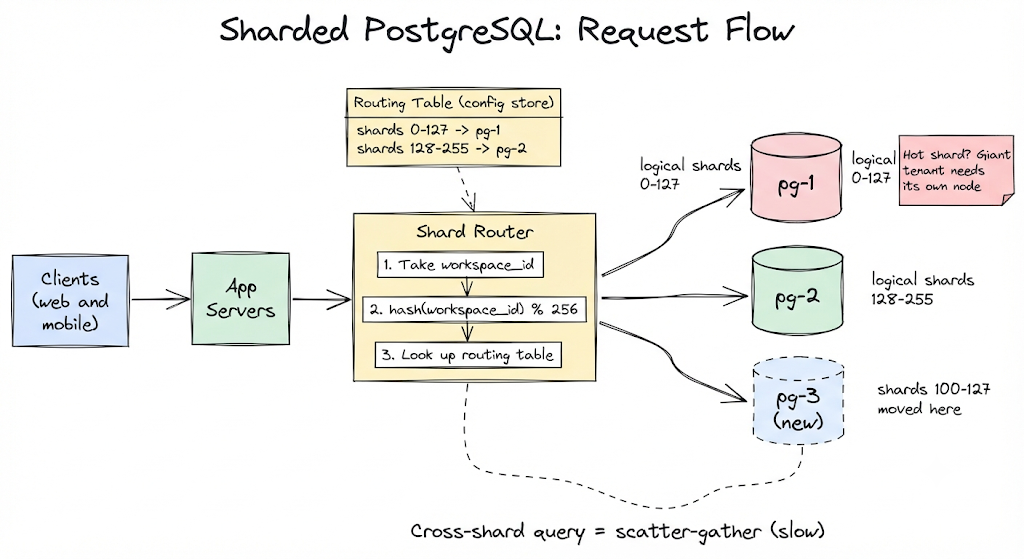
The fix is to hash into a fixed number of logical shards, then map those to physical servers separately.
import { createHash } from "crypto";
import { Pool } from "pg";

const LOGICAL_SHARDS = 256;

const pools: Record<string, Pool> = {
  "pg-1": new Pool({ connectionString: process.env.PG_1_URL }),
  "pg-2": new Pool({ connectionString: process.env.PG_2_URL }),
};

// logical shard -> physical node.
// In real life this lives in a config store, not in code.
const routing: string[] = Array.from({ length: LOGICAL_SHARDS }, (_, i) =>
  i < 128 ? "pg-1" : "pg-2"
);

function logicalShard(workspaceId: string): number {
  const digest = createHash("md5").update(workspaceId).digest();
  return digest.readUInt32BE(0) % LOGICAL_SHARDS;
}

export function poolFor(workspaceId: string): Pool {
  return pools[routing[logicalShard(workspaceId)]];
}
And a query now looks like this:
export async function getRecentPages(workspaceId: string) {
  const pool = poolFor(workspaceId);

  const { rows } = await pool.query(
    `SELECT id, title
       FROM pages
      WHERE workspace_id = $1
      ORDER BY updated_at DESC
      LIMIT 50`,
    [workspaceId]
  );

  return rows;
}
Notice the query always carries the shard key. That's what keeps it on one shard.
Here's the payoff. When pg-2 gets crowded, you add pg-3, copy logical shards 100 to 127 over, and flip those routing entries. The hash function never changes, and only the shards you chose to move are affected.
What can still go wrong
Sharding fixes the scaling problem and hands you a new set of them. Here are the ones that bite.
A tenant that's too big. If one giant workspace outgrows its shard, hashing can't help you. You need a plan for isolating huge tenants on their own hardware.
Cross-shard queries. Anything that isn't scoped to your shard key, like a global admin report, has to hit every shard. It's slow and it's easy to write by accident.
Cross-shard transactions. A single Postgres transaction can't span two databases. You'll end up with patterns like sagas and eventual consistency, and you'll have to think about partial failure.
ID collisions. Auto-increment IDs on separate databases will produce the same numbers. You'll want globally unique IDs like UUIDs or time-ordered ones.
Migrations everywhere. One schema change now means running it across every shard, and handling the case where it succeeds on some and fails on others.
Partial outages. When one shard goes down, only the workspaces on it are affected. That's better than a total outage, but support tickets still arrive, and now your on-call needs to know which shard is which.
Resharding under load. Moving data while users keep writing to it is the hardest operational task in this whole story. Plan it before you need it.
Final thought
Sharding doesn't remove complexity. It moves it out of the database and into your application and your operations.
That trade is absolutely worth making when one machine can't carry the load anymore. Just make sure you've actually reached that point, and that your shard key matches the way your product really queries data.
What's the worst shard key decision you've seen (or made) in a real system, and what finally forced the team to fix it? Tell me in the comments.
#database #sharding #postgresql #systemdesign #backend #distributedsystems